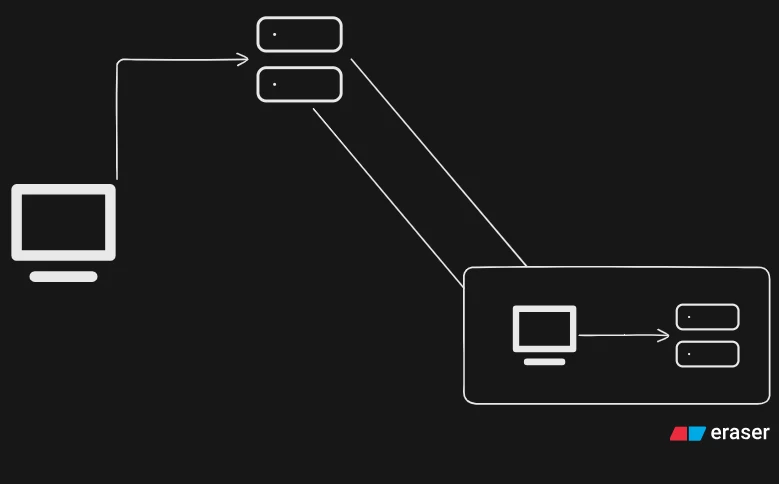
We've all used tools like Ngrok or Cloudflare Tunnels to quickly expose a local development HTTP server to the internet. They're very good at what they do and come packed with enterprise-grade features like analytics, edge security, and global routing.
At their core, these platforms rely on a fundamental networking concept: HTTP tunneling and reverse port forwarding.
Recently, I was working on some APIs where I needed to do some port forwarding to use a local API elsewhere. I was using Ngrok, but it kept showing its default warning page ("You are about to visit..."). Because of that warning screen, my automated API requests were failing, and I couldn't use it.
I started searching for open-source solutions, but then I thought: Why am I searching for a solution when I can just make my own? I know Go, which is super good for networking and concurrency. Building this would be great practice and would help me gain some xp in Go, since I don't get to use it too often.
It doesn't have all the juices of commercial tools, but it does exactly what I need. Here is how it works.
What is Port-Forwarding/Tunneling and How It Works?#
Before putting our head on the code, let's look at the actual problem (the pain) a port-forwarding tool solves.
When you run a server locally (like localhost:8080), your server sits behind your router's NAT (Network Address Translation) and firewall. So if a public service, like a webhook or a frontend hosted on a different machine, tries to send an HTTP request to your computer's IP address, your router will BLOCK IT. The public internet simply cannot connect to your local machine.
So to bypass this without messing with your router's dangerous port-forwarding settings, we can uno reverse the setup and use reverse tunneling.
Instead of making the internet try to connect to your machine, your machine will connect out to a public server, since firewalls will (generally) allow this outbound traffic.
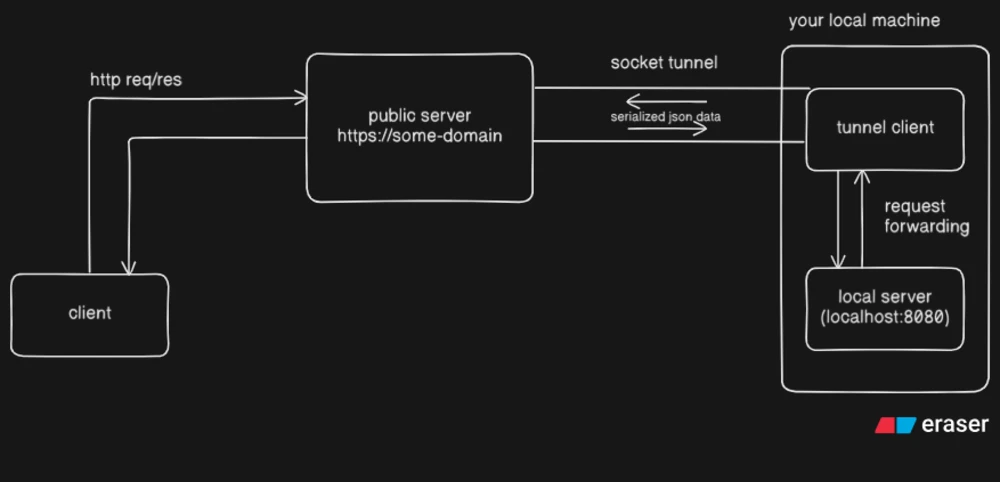
Here's how traffic flows through the tool:
-
Persistent Connection: Run the tunnel client on your machine. It connects to your public server (a VPS with a static IP) and it'll keep the connection open.
-
Public Request: A user or an external client hits your public server's domain (http://<your-domain>).
-
Hand-off: The public server intercepts that request, packs it up, and sends it through the already-open connection to your local tunnel client.
-
Local Proxy: The local client receives and unpacks the request, fires it at your actual local server (localhost:8080), grabs the response, packs it up, and sends it back up to the public server, which in the end is delivered to the user.
Core Implementation in Go#
When building a tunnel, the biggest hurdle is multiplexing. If multiple people visit your public URL simultaneously, all those separate HTTP requests have to travel down the same single connection to your local machine, and the responses have to find their way back to the right browser.
Instead of rolling raw TCP sockets or pulling in heavy third-party framing libraries, I built the transport layer using WebSockets. WebSockets give us a persistent, full-duplex connection out of the box, which is perfect for a reverse tunnel.
Here is exactly how the system is put together. Github repo for the project here.
1. The Client Handshake & Authentication
The server exposes a dedicated endpoint /__tunnel__, specifically for the client to connect to. To prevent random internet scanners from hijacking the server, the client must pass a shared secret in the X-Tunnel-Secret HTTP header during the initial WebSocket upgrade. If the secret doesn't match, the server rejects it immediately with a 401 Unauthorized.
2. A Clean JSON Wire Protocol
Since WebSockets allow us to pass structured data easily, I defined a clean JSON protocol to serialize entire HTTP lifecycles into packets.
To handle request and response bodies safely (as they can be plain text or binary data (files and stuff)), I leveraged a native feature of Go's encoding/json package: if you type a field as a byte slice ([]byte), Go automatically base64-encodes it during marshalling and decodes it during unmarshalling. This keeps the data transport completely lossless without needing manual encoding layers, saving you from writing custom base64 encoding/decoding logic.
type RequestMessage struct {
	ID      string            `json:"id"`
	Type    string            `json:"type"`
	Method  string            `json:"method"`
	Path    string            `json:"path"`
	Headers map[string]string `json:"headers"`
	Body    []byte            `json:"body"`
}
3. The Proxy Bridge & Channel Tracking
This is where the magic happens(it's not magic). When a public user hits the VPS, the server converts that incoming HTTP request into a RequestMessage, maps the query strings cleanly using r.URL.RequestURI(), and flattens the headers into our schema.
Instead of cluttering this handler with mutex locks and map management, the tunnel object provides a clean SendRequest method that registers a temporary channel under the hood and returns it immediately so we can cleanly select on the response or a timeout.
func (s *Server) handleProxy(w http.ResponseWriter, r *http.Request) {
	s.mu.Lock()
	t := s.tunnel
	s.mu.Unlock()
	if t == nil {
		http.Error(w, "No tunnel", http.StatusBadGateway)
		return
	}

	id := uniqueID()
	body, err := io.ReadAll(r.Body)
	if err != nil {
		http.Error(w, "Failed to read body", http.StatusInternalServerError)
		return
	}

	reqMessage := &protocol.RequestMessage{
		ID:      id,
		Type:    "request",
		Method:  r.Method,
		Path:    r.URL.RequestURI(),
		Headers: make(map[string]string),
		Body:    body,
	}

	// adding headers to request message
	for k, v := range r.Header {
		reqMessage.Headers[k] = v[0]
	}

	// sending request message to tunnel
	ch, err := t.SendRequest(reqMessage)
	if err != nil {
		http.Error(w, "Failed to send request", http.StatusInternalServerError)
		return
	}

	select {
	case resp := <-ch:
		for k, v := range resp.Headers {
			w.Header().Set(k, v)
		}
		w.WriteHeader(resp.Status)
		w.Write(resp.Body)
	case <-time.After(PROXY_TIMEOUT):
		http.Error(w, "Timeout", http.StatusGatewayTimeout)
	}
}
func (t *Tunnel) SendRequest(req *protocol.RequestMessage) (<-chan *protocol.ResponseMessage, error) {
select {
case <-t.done:
return nil, errors.New("Tunnel closed")
default:
}
data, err := req.MarshalJSON()
if err != nil {
return nil, err
}
ch := make(chan *protocol.ResponseMessage, 1)
t.pending.Store(req.ID, ch)
// queue the request to be sent
select {
case <-t.done:
return nil, errors.New("Tunnel closed")
default:
t.writeCh <- data
}
return ch, nil
}4. The Background Reader Loop
While the HTTP handler thread is blocked waiting on its channel, a continuous background loop reads incoming messages from the WebSocket.
Because Go web servers handle incoming requests concurrently across multiple goroutines, I used a thread-safe sync.Map (t.pending) to look up our pending channels. When a response arrives, the loop looks up the ID, streams it directly into the channel to wake up the blocked HTTP handler, and cleans up the map.
func (t *Tunnel) ReadLoop(onClose func()) {
	defer func() {
		if onClose != nil {
			onClose()
		}
	}()

	for {
		select {
		case <-t.done:
			return
		default:
		}
		_, msg, err := t.conn.ReadMessage()
		if err != nil {
			return
		}

		var resp protocol.ResponseMessage
		if err := resp.UnmarshalJSON(msg); err != nil {
			continue
		}

		ch, ok := t.pending.Load(resp.ID)
		if !ok {
			continue
		}

		ch.(chan *protocol.ResponseMessage) <- &resp
		t.pending.Delete(resp.ID)
	}
}
Features & Edge Cases (Error Handling)#
Building a network tunnel requires defensive programming because things go wrong constantly on the public internet. Here is how the system handles various failure modes:
-
No Client Connected: If a user hits the public URL but no client has dialed into the
/__tunnel__endpoint, the server safely handles it and responds with a 502 Bad Gateway instead of hanging. -
Client Disconnects Mid-Request: If the local tunnel connection drops while a browser is waiting for an active response, the ReadLoop terminates, and the handler fallback to returning a 502 Bad Gateway.
-
Request Timeout: If local backend service hangs or drops a request, the server won't let the browser socket hang forever. Thanks to Go's select statement paired with
time.After(PROXY_TIMEOUT), it automatically breaks out after 30 seconds and yields a 504 Gateway Timeout. -
Automatic Reconnection: Networks drop packets. The CLI client features built-in retry logic so that if the WebSocket drops, it gracefully handles the backoff and reconnects to the VPS without crashing.
What I learned & What I can do next#
Taking a step back from commercial tools to build this helped me a lot to learn about formatting raw headers, tracking asynchronous network state across goroutines, and serialization tricks in Go.
Using native Go primitives like channels, sync.Map, and select made it surprisingly straightforward to orchestrate multiplexing without fighting the language.
For the next iteration(I might not do it or I can, idk), I'm planning to look into:
-
Multiple Client Subdomains: Dynamic routing so different clients can share a single server instance using subdomains (e.g., client1.vps.com vs client2.vps.com).
-
Connection Pooling: Keeping multiple WebSocket lines open to separate high-throughput traffic lines.
This project is completely open-source, You can check out the full repository, setup guide, or even clone it to host it on your own server here.
A quick heads-up: I didn't build this to be the best, ultimate way to handle network tunneling. This is simply the approach I came up with to solve my own problem and gain some xp with Go. There might be better, more optimized ways to handle things like multiplexing or memory management.
If you look through the code and spot something that could be improved, find anything technically incorrect, or just want to suggest a better approach, please let me know! I'd love to learn from your feedback. You can find all my contact links at the bottom of this page. Thanks!