How to Create Your Own Blog Site Without It Sucking
A practical, no-database approach to building your own MDX-powered blog with GitHub, Bun, and a CDN — automated with GitHub Actions.
This is how i did it — might not be the best way!
Part 1 — Setting Up the Content Pipeline#
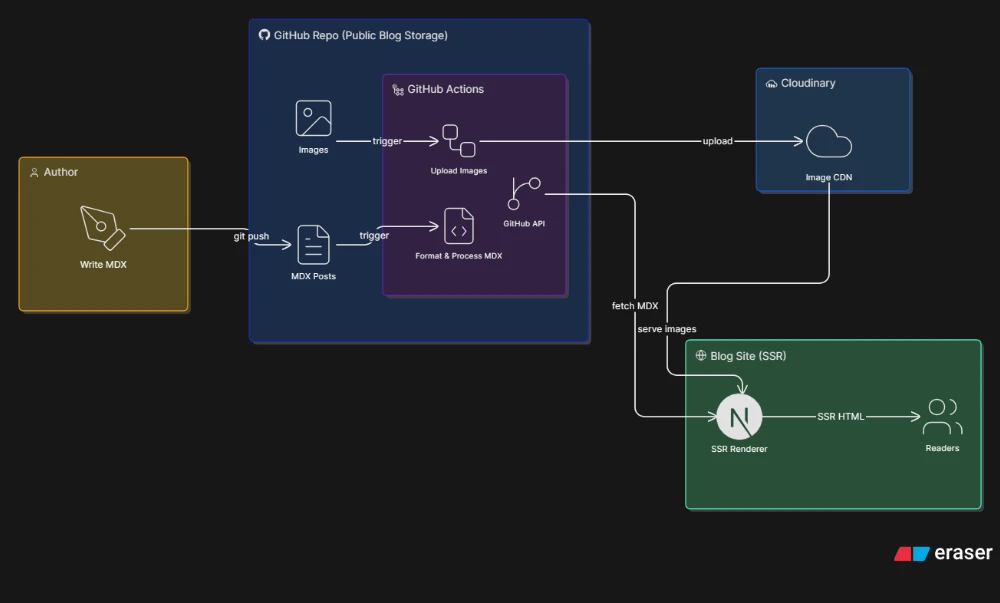
Start by creating a public/private repo on GitHub. Then init a Bun workspace and put all your MDX-based blog content in one place — something like /blogs/[slug]/blog.mdx. Throw all your images into an /images folder alongside it.
Next, write a script (I used Bun — it's really good at I/O stuff) to extract meta from all your MDX files: slug, title, description, that kind of thing. Create an array from that, do some processing to get related posts for each one (keyword-based or whatever works for you), and sort everything by date if you have it in your meta.
Save that array to /data/blog-index.json.
Then upload all your images (keeping the same paths) to any CDN you like — I used Cloudinary. Once they're pushed, delete the local copies.
Now the best part — write a GitHub Actions workflow to do all of this automatically whenever an .mdx file is added or modified. The script runs, does its thing, and pushes the changes with [skip ci] in the commit message.
What's [skip ci]?
It tells the workflow to skip running when it sees that tag in a commit message. Since our script updates the MDX files too (which would re-trigger the action), you really don't want an infinite loop here!
Why are the MDX files updated too?
When we process the files and generate related posts, I'm writing those back into each MDX file's frontmatter as well.
Part 2 — Rendering on Your Site#
For the stuff that should run in a server environment (for my vibe coders) — I'm using Next.js, so I handle it server-side. You could create APIs and fetch from them, but try to go SSR for SEO's sake!
In the site where you want to render your MDX blogs (I use my portfolio site), use the GitHub API (grab a token) to fetch blog-index.json and render all your posts using any MDX renderer package — or build your own (nerd).
One thing to keep in mind: since we uploaded images to Cloudinary, you need to set the base public URL. If you kept the image paths in your MDX consistent with how they're stored in Cloudinary, it'll just work. If not, configure it according to your setup. You can also fetch individual MDX files by slug (if you used the slug in the filename or path like I did) and render related posts alongside them.
Final Thoughts#
This approach works pretty well I think — adding a new post is super easy, and you can plug in or remove pieces as you go. Oh and up till now, there's no database involved at all, which is totally fine! But if you want things like view counters or comments, you'll need one.
You can also skip Cloudinary entirely and just put images inside the /public folder of your site.
That's how I did it! If you've got thoughts on this approach, want to fix something, or just want to suggest something better — reach out, links are at the end of the page.